
Free macOS app for Logic Pro
LPX Explorer
Find anything in your Logic Pro projects without opening Logic: search by project, track or plug-in, and play the bounces.
- macOS 14+
- Open source (GPL-3.0)
- No network access
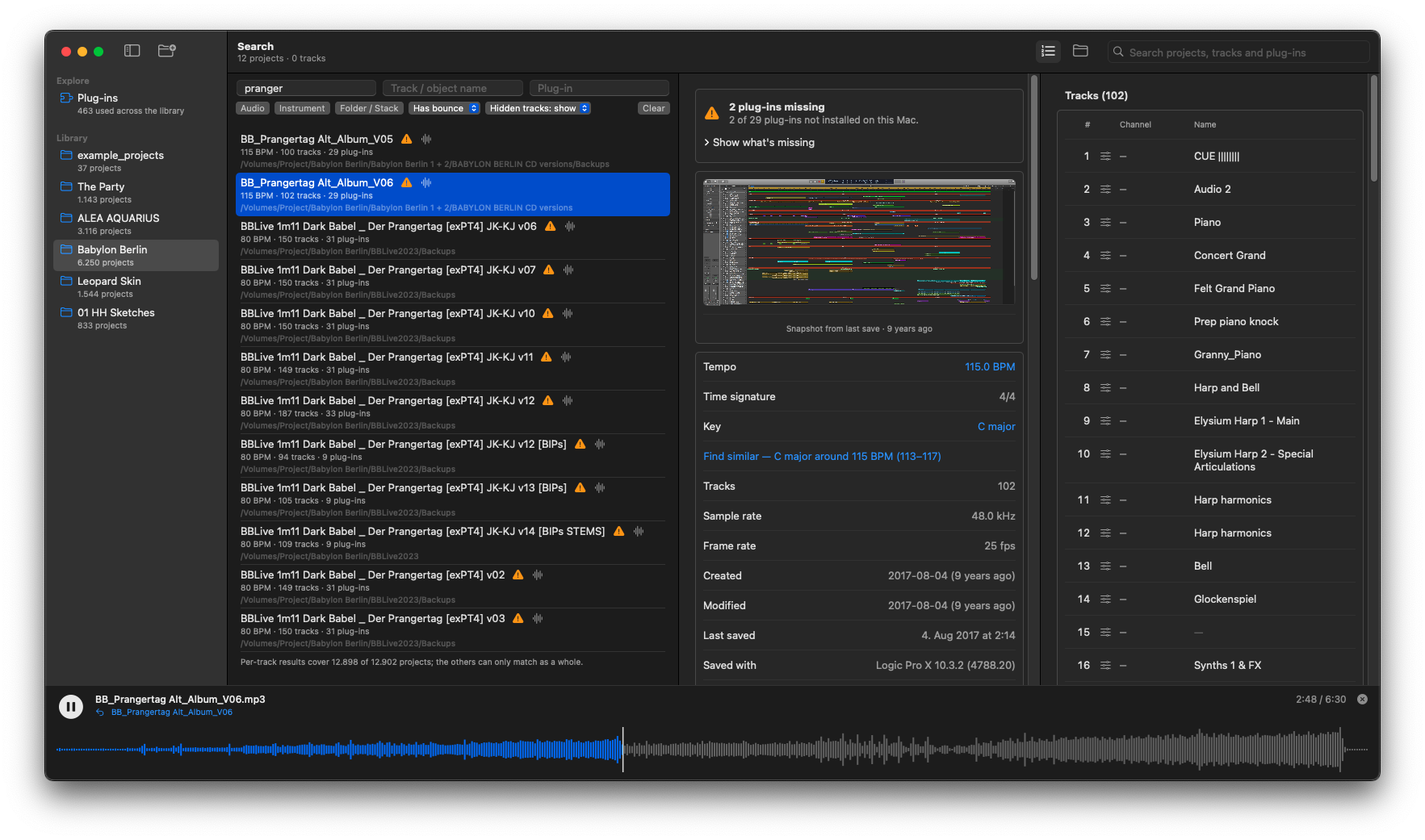
LPX Explorer is a native macOS app for finding things in Logic Pro projects (.logicx) without opening Logic. Point it at your project folders and search across the whole library by project name, track and channel names, and plug-ins. Click a result and the project opens scrolled to that track. It also finds each project's bounces and plays them.
What it does
- Library-wide search. One search box plus filters for project name, track name and plug-in. Narrow results to audio or instrument tracks, projects with or without a bounce, or hidden tracks.
- Track view. Track numbers, hidden tracks, folders, and each track's channel and object.
- Bounces and player. Finds mixes and stems in a project's
Bouncesfolder and plays them with a waveform player: click to jump, space bar to play and pause. - Plug-ins. See which plug-ins your library uses, which projects use them, and which are missing on this Mac.
- Project details. Tempo, key, time signature, sample rate, frame rate, dates, size, Logic version and the window screenshot. Click a key or tempo to find similar projects.
- Fast. Each project is read once, in parallel; later scans only re-read new or changed projects.
- Old projects too. Logic Pro X 10.5 and earlier, plus single-file Logic 4 to 9 (
.lso) projects.
Safe and local
LPX Explorer only reads your project files and never opens Logic. It makes no network requests, and its cache lives in ~/Library/Application Support/LpxExplorer.
Install
- Download the latest
LPX-Explorer-vX.Y.Z.dmgfrom the releases page. - Open the disk image and drag LPX Explorer to your Applications folder.
- Add a folder of projects with Cmd-O or by dragging it onto the window. The first scan of a large library can take a while.
Official releases are signed with a Developer ID and notarized by Apple. A manual is included in the app under Help, LPX Explorer Manual.
Open source
LPX Explorer is free software under the GPL-3.0-or-later. The source code is in the GitHub repository. It is a native rewrite of the original LPX Explorer by Rhyd Lewis, whose reverse-engineering work on the Logic project format this app builds on.
Say thanks
LPX Explorer is free and stays free. If it saves you time, you can buy me a coffee. Entirely optional.
Questions, bug reports or ideas: support@good-loops.com.